


🔓 Alttube TV Registration #
🚀 Getting Started | Alttube TV Registration #
Creating your account through Alttube TV Registration is fast, simple, and designed for a smooth user experience. Within just a few minutes, you’ll gain access to a personalized dashboard, allowing you to explore content, manage your profile, and interact with the platform seamlessly.
Step 1: Access the Alttube TV Registration Page #
- Visit the official homepage: Alttube.tv
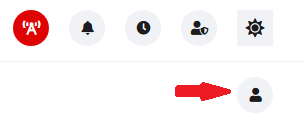
- Click the “Person Icon Button” located in the top right corner
📝 Create Your Alttube TV Registration Account #
Step 2: Enter Your Details #
To complete your Alttube TV Registration, fill out the required fields carefully:
- Username – Choose a unique display name
- Email Address – Use a valid and accessible email
- Password – Create a strong and secure password
💡 Tip: Combine uppercase letters, lowercase letters, numbers, and symbols to strengthen your password and protect your account.
🔐 Verify Your Email #
Step 3: Confirm Your Account #
- Check your inbox for your verification email
- Click the verification link to activate your account (check spam/junk folders if needed)
✅ Your Alttube TV Registration will be fully activated immediately after verification.
⚙️ Alttube TV Profile Update (Optional) #
Step 4: Customize Your Experience #
Once logged in, your Alttube TV Registration allows you to personalize your account by updating your profile:
- Upload a profile picture & channel banner
- Add a bio or description
- Adjust account preferences
Completing your profile helps improve your experience and makes your account more recognizable within the platform. View the documentation (Alttube TV Profile Update) for details.
🔑 Logging In After Registration #
Access Your Account Anytime #
- Click “Login”
- Enter your email and password
- Access your personalized dashboard
❗ Troubleshooting Alttube TV Registration #
Didn’t receive the verification email? #
- Check your spam or junk folder (especially in Gmail)
- Wait a few minutes and refresh your inbox
- Request a new verification email
Forgot your password? #
- Select “Forgot Password?” on the login page
- Follow the reset instructions provided
If you’re still having problems, use our Contact Us form or the Live Chat Page.
🔒 Security Best Practices #
Protect Your Alttube TV Account #
- Never share your login credentials
- Use a strong, unique password
- Log out when using shared or public devices
Taking these steps ensures your Account remains secure and protected at all times.
✅ Summary #
Registering on Alttube.tv is straightforward: #
- Click Register
- Enter your details
- Verify your email
- Log in and start using the platform
Your Alttube TV Registration is your gateway to a fully personalized experience. Once completed, you’ll be ready to explore, engage, and get the most out of everything the platform offers.